Search TikTok Comments by Keyword and Read Replies
To search TikTok comments in tokviewer.app, load a video's available public comments, then enter a keyword or author in the comment browser. The search checks the rows already captured and keeps related replies visible for context. It does not search every comment on TikTok or guarantee that a video's complete discussion has been retrieved. Start from the TikTok comment viewer when you have a video link ready.
For the reading workflow and capture checks before you search, use the public TikTok comment viewer guide.
Key Takeaways
- Search checks author names, handles, and comment text within the captured rows.
- A query matches one continuous string, without case sensitivity; it does not run Boolean searches or translate words.
- A matching reply can bring its parent and other captured replies into view, so visible rows may exceed the match count.
- Search filters the reading view. The current export includes all captured rows and requires sign-in.
How to search the comments you have loaded
Begin with the video's discussion, then narrow it to one concrete question. For example, a seller reviewing delivery questions could start with shipping. A creator checking a particular conversation could use part of an author's name or handle.
- Load the video. Paste its link into the capture workspace and wait for available comments to appear. Check any notice about incomplete replies or interrupted loading.
- Find the comment search field. Enter a short keyword in “Search comments or authors.” Search applies to the currently captured set; typing a query does not itself retrieve more comments.
- Read the counter. The first number is matching rows, and the second is all captured rows, including captured replies. Neither number represents a verified total for the video.
- Read the conversation around a match. With a nonempty query, reply groups open automatically. Check the parent before interpreting a short answer such as “yes” or “next week.”
- Adjust the search or sorting. Try another spelling separately, or choose “Most liked” to reorder the displayed conversation groups. Clear the query to return to the unfiltered captured set.
If “Load more comments” is available, loading more can expand the set being searched. A notice that no more top-level comments were returned still does not establish that all replies were retrieved.
What counts as a keyword or author match?
The search combines each row's author name, handle, and text, converts that combined text and the query to lowercase, and looks for the query as a continuous substring. Spaces at the beginning and end of the query are removed. Spaces and punctuation inside it still matter.
| Query | How to interpret it |
|---|---|
shipping |
Matches Shipping, and also shipping inside a longer word such as dropshipping. |
free shipping |
Looks for that continuous phrase; it does not also match shipping is free. |
shipping refund |
Looks for that sequence, not two independent required words. |
shipping OR refund |
Treats the whole query as text; OR is not an operator. |
mira |
Can match an author or handle even when the comment text lacks that string. |
Quotation marks, regular expressions, and automatic translation are not search features here. Search shipping, ongkir, and 배송 separately if those languages are relevant to your review. A match tells you that a string occurs in the captured row; it does not classify the author's intent or sentiment.
Why can one match display three comments?
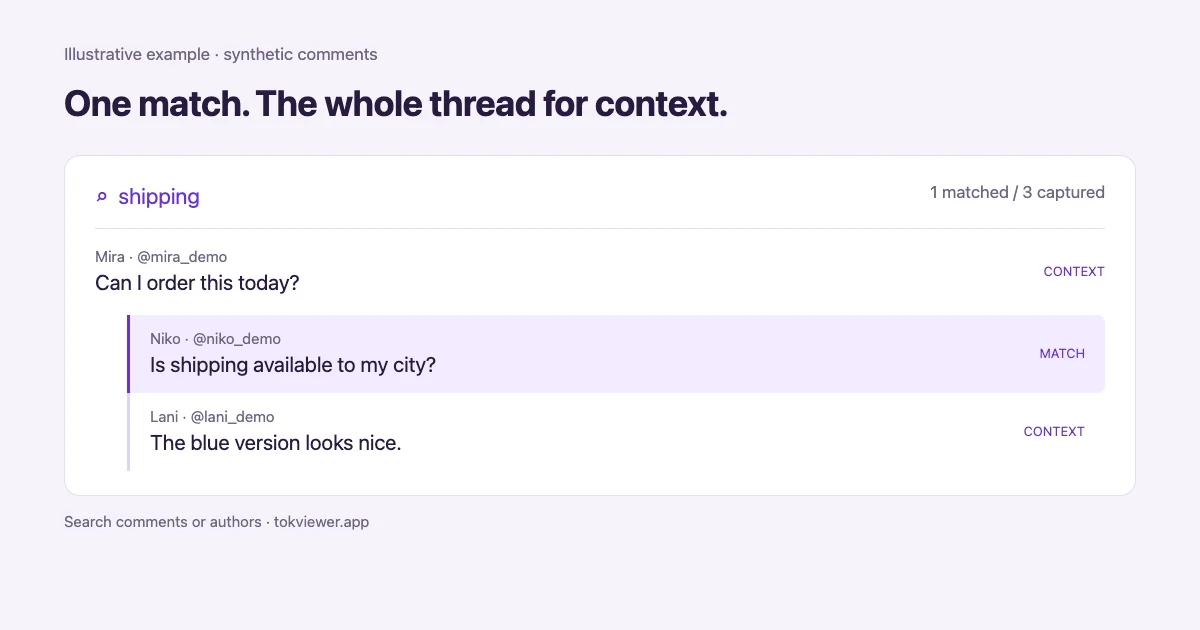
The viewer preserves the captured conversation around a matching reply. Consider this synthetic example, created solely to explain the interface:
| Row | Author | Text |
|---|---|---|
| Parent comment | Mira | “Can I order this today?” |
| Reply to Mira | Niko | “Is shipping available to my city?” |
| Another reply to Mira | Lani | “The blue version looks nice.” |
Searching shipping matches only Niko's reply. With exactly these three captured rows, the counter reads 1 / 3. Yet the reading view shows Mira's parent comment and both captured replies: three visible rows, one textual match.
This is useful context, not three independent mentions of shipping. When noting results, distinguish “one matching row” from “one conversation shown.” The other reply remains visible because it belongs to the same parent, not because its text passed the query. The same principle matters when a parent matches: its captured replies can provide context without each matching individually.
Read the parent and nearby replies before quoting a result. A reply that says “not available” may answer a specific city's delivery question rather than describe every order.
What does “Most liked” actually sort?
“Most liked” sorts parent comments by their own captured like counts and sorts replies separately within each parent group. It does not flatten all parents and replies into one global leaderboard. A reply with more likes than another parent can therefore remain lower on the page inside its own conversation.
“Capture order” returns to the ordering of the captured data. Do not treat either setting as a guarantee of TikTok's current ranking or a verified chronological history. Sorting helps you read the available set; it cannot fill missing comments or replies.
What to check when there are no results
First clear the search to confirm that comments have loaded. Then try a short fragment copied from a visible row. If that works, check the original query for internal spaces, punctuation, different spelling, or a translated term that never appeared in the text. Try a handle fragment without the displayed @ symbol.
Next check the capture scope. A missing reply, an incomplete loading notice, or comments not yet loaded can explain an absent match. Record “no match in the captured set,” rather than concluding that nobody mentioned the topic. TikTok also allows comments to be deleted, so a previously seen comment may no longer be available. See TikTok's comments documentation.
This viewer does not recover private, hidden, or deleted content. TikTok's own keyword filtering is a separate moderation feature for comments on your posts; filtered comments are hidden unless approved. It is not this reading-view search. See TikTok's comment settings.
Does exporting save only the search results?
No. In the current workspace, export uses all captured rows, not just the matches visible under your search query. Downloading requires sign-in. If you need a keyword-only file, export the captured set and filter it offline, keeping parent and reply relationships where possible.
Choose a file using the comment export formats guide, then use the Google Sheets analysis guide for spreadsheet work. Before sharing a filtered result, note the video, capture scope, query, and whether you counted matching rows or conversations. That makes a small review understandable without suggesting it represents the entire discussion.