TikTok Comment Viewer: Read Public Comments Without an App
A TikTok comment viewer lets you read a video's available public discussion in a browser. Paste the video link into the comment capture workspace, wait for a result, then review the captured comments. You can search their text or authors and read available replies beside their parent comments. Installing the TikTok app is not part of this workflow.
Viewing available comments can work without signing into the workspace; exporting requires sign-in. Public access also has limits: a successful capture is a set of returned rows, not proof that every comment or reply has loaded. This guide shows how to check the result before treating it as evidence.
Key Takeaways
- Begin with one public video link and confirm the returned video before reading its comments.
- Search covers captured comments and replies; it does not find an author's comments across TikTok.
- Empty results, loading failures and partial captures need different interpretations.
- Export requires sign-in and includes all captured rows, even when a reading filter is active.
What you can read with a public comment viewer
The reading workspace shows returned comment text, author information, captured like counts and available replies. It is useful when you want to check a question under a specific video or find a conversation without scanning every loaded row manually.
It cannot recover private, deleted or otherwise inaccessible content. It also does not provide someone's complete comment history. A username search checks the author information attached to rows captured from the current video. Finding that username in this set says nothing about their activity on other videos.
Keep account viewing separate from comment viewing. A public profile, a list of available videos and the discussion under one video are different results. A profile loading successfully does not establish that its Stories, reposts or follower lists can be retrieved.
Before you start
You need a browser and the link to a public TikTok video. Copy the video's link rather than a screenshot or a profile name. A full video URL identifies the account and video; a shared short link may need to resolve before the capture can begin.
For a reading check, start with a video whose discussion you can also inspect on TikTok. That gives you a way to confirm the correct source and notice obvious gaps. You do not need to sign into the workspace to try reading available public comments. Be ready to sign in if your next task is downloading a file.
Write down your question before loading: for example, "Are there delivery questions in the available comments?" A narrow question makes it easier to distinguish what you observed from what remains unknown.
Load the video and verify the source
Open the capture workspace, paste the video URL into its input and start the capture. Wait for the loading state to resolve. When a result appears, compare the returned creator, video details and original TikTok link with the source you intended to review.
Read the capture notice before scrolling through the comments. If the interface reports incomplete loading or missing replies, retain that notice in your notes. If additional comments can be loaded, retrieving them can expand the set available for review. The absence of another page does not establish that every reply has been returned.
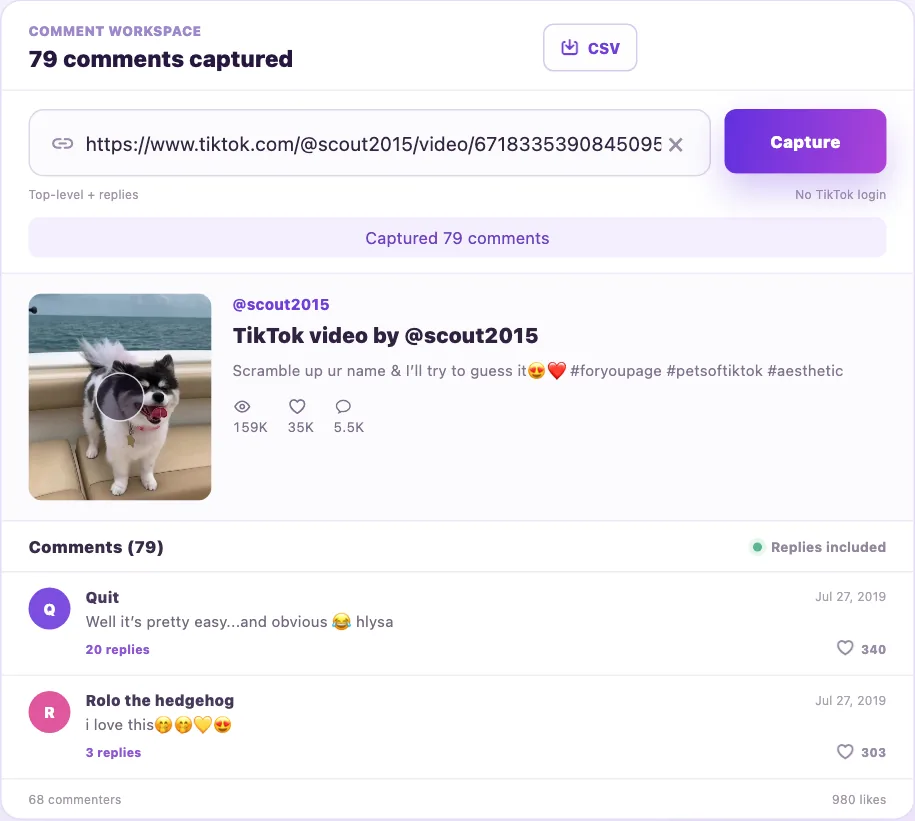
Existing workspace screenshot used to illustrate the reading interface. It is not evidence of today's capture count or complete coverage.
An interface preview and a live result serve different purposes. Use the preview to locate the reading area, then use your actual result's source, counts and status to decide what you can report.
Understand the count before drawing a conclusion
The captured count describes returned rows, including captured replies. It is not a verified count of every comment currently available on the video. A displayed TikTok comment total and a downloaded row count may therefore differ without either representing the same measurement.
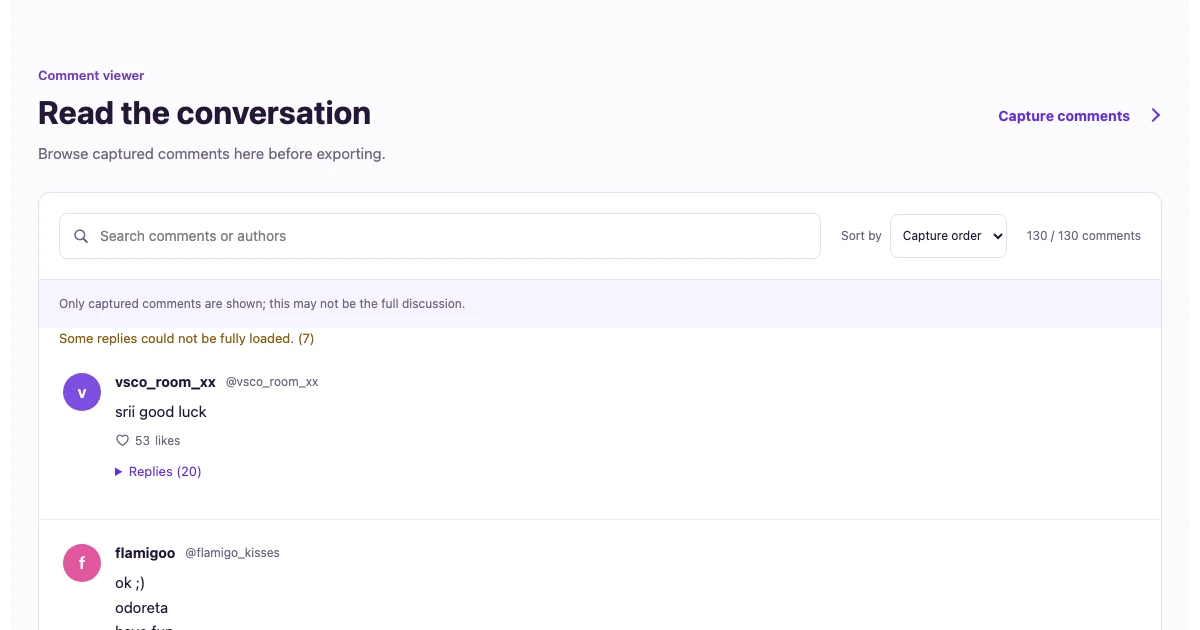
In our October 2, 2026 check, a signed-out workspace loaded 130 rows from this public video by scout2015. Searching flamigo changed the counter to 10 / 130. Export then prompted sign-in. This is one observed result from one video, not a claim that another video will return the same number or that this capture was complete.
Interpret the state along with the number:
| Result you see | What you can conclude |
|---|---|
| Comments returned | Those rows were available to this capture; completeness is still unverified. |
| No comments returned | This attempt returned no rows; it does not establish that the video has no comments. |
| Loading failed | Retrieval did not finish successfully; do not record a zero-comment finding. |
| A partial-result notice | You can read the available rows while retaining the stated limitation. |
For a review note, "130 rows captured in this attempt" is more accurate than "all 130 comments on the video."
Search the available discussion and read replies in context
Enter a short phrase or author fragment in Search comments or authors. The current search checks author names, handles and comment text as one continuous string, without case sensitivity. It does not run Boolean queries or translate terms automatically.
Start with a short term such as shipping, then try relevant variants separately. A name match can come from an author's handle rather than their comment body. Check which field matched before counting a result as a topic mention.
A matching reply can bring its parent and other captured replies into view. Those additional rows provide context; they do not necessarily match the query. Read the parent's question before interpreting a short reply such as "yes" or "next week." The counter measures matching rows, while the screen can show a larger conversation.
For exact matching examples, sorting behavior and no-result checks, use the keyword and author search guide. Clear the search to return to the captured set before changing your review question.
Decide whether you need a file
Reading and downloading have different access requirements. The current export flow requires workspace sign-in and uses all captured rows, including rows hidden by your reading filter. A filtered screen does not establish that your download contains only matching comments.
If you need a keyword-only dataset, keep an untouched export, then filter a working copy offline. Preserve the source link, capture metadata and parent/reply identifiers so another reader can trace the review. Missing platform IDs should remain missing rather than being replaced with guessed identifiers.
The CSV walkthrough explains the collection-to-file workflow. For spreadsheet review, the Google Sheets guide covers manual categories. If you use Excel, follow the text-safe identifier guide before sorting or joining long IDs.
Check missing comments without assuming they disappeared
First remove your query and see whether any comments loaded. If there are rows, search a fragment copied from a visible comment to check the query behavior. Then revisit spelling, spaces, punctuation and language. No match for one phrase means no match in this captured set.
If the capture itself is empty or failed, check the original video link and access on TikTok. For settings on the original platform, refer to TikTok's comments documentation and comment settings guide. Original-platform controls are separate from a viewer's reading filter; a third-party result cannot establish which setting explains an absent row.
Finish with a note containing the video link, capture date, returned-row count, query, matching-row count and any loading limitation. That is enough to make a small review understandable without turning it into a claim about the entire discussion. When you have your source ready, open the comment workspace and verify the video before reviewing its replies.