TikTok Story Viewer: View by Username and Privacy Limits
A TikTok Story viewer lets you look up a creator's available public Stories by username or profile link. To try the browser workflow, open the public Story viewer, enter the exact username, select Stories and open a returned video or photo. A loaded profile alone does not mean a Story has been retrieved.
The same phrase can also mean the creator's list of people who watched a Story. That list belongs to a separate workflow inside TikTok. This guide covers both meanings and explains what an online viewer can show, whether viewing is anonymous, and what to check when Stories will not load.
Key Takeaways
- TikTok describes ordinary Stories as photos or videos visible for 24 hours; Highlights can keep selected Stories visible longer.
- TikTok's official instructions say creators can see their Story view count and the accounts that watched it.
- No-login browsing and unrecorded viewing are different claims. We have not verified third-party anonymity from a creator's viewer list.
- TokViewer production checks on October 11, 2026 loaded four Story videos and two photos from two public accounts. These are dated results, not guaranteed current samples.
What a TikTok Story viewer can mean
The phrase has two common meanings: a tool for watching someone else's Stories, or the list of people who watched your own Story. Choose the workflow that matches your goal.
| Your goal | Where to start | What to verify |
|---|---|---|
| Watch a creator's current Story | The creator's available Story on TikTok | The content is current and visible to you |
| Try a browser-based public Story lookup | A third-party viewer with the exact username | Actual Story media loads, not just profile details |
| See who watched your own Story | Your Story in the TikTok app | The view count and viewer accounts |
| See content retained beyond the normal Story window | The creator's Highlights, if available | It is a saved Highlight rather than an active Story |
A profile viewer can return a display name, avatar and follower count while Story retrieval fails. Those profile fields do not prove that the tool supports current Stories. Likewise, a regular video retrieved from the creator's post grid is not evidence of Story support.
For a broader browser workflow, see our guide to viewing TikTok without an app. Its discussion of public pages should not be interpreted as guaranteed access to every Story.
How to use an online TikTok Story viewer by username
Start with the exact account handle, including periods or underscores. A display name can match several accounts. In TokViewer, enter the username or full profile link, choose Stories, then open an item to check whether the video plays or the photo displays. Our dated playback tests are documented below; they do not guarantee that the same account has a Story today.
- Copy the creator's current TikTok username or profile URL.
- Submit it in the Stories entry and compare the returned handle with the source account.
- Inspect the Stories results separately from regular posts and saved Highlights.
- Open a returned item. If only profile information appears, Story playback has not been established.
- If the request fails, compare with TikTok itself before deciding whether the content is absent or expired.
For examples of handles, profile links and account matching, see TikTok Story lookup by username. This is a lookup of available public media, not a way to access private Stories or someone else's viewer list.
Can you view TikTok Stories without an account?
The browser lookup does not ask for your TikTok password. Whether the source returns a particular Story is a separate question; a no-login interface cannot guarantee availability or anonymity. A website's own account requirements and limits can also differ from TikTok login requirements.
Our guide to viewing TikTok Stories without an account explains that workflow and its limitations. If you compare services, check what loads before treating “no account required” as proof of access.
How to view Stories on TikTok
Use TikTok itself as the reference when checking whether a Story is available. TikTok's official Stories help article describes Stories as photos and videos visible for 24 hours and identifies the profile, inbox, For You and Following surfaces where Stories can appear.
- Open TikTok and find the exact creator account. Compare the username rather than relying only on a display name or avatar.
- Open the creator's Story where TikTok makes it available to you. If you have a shared link, confirm which account and content it opens.
- Check whether you are seeing a current Story, a regular post or a saved Highlight. Their availability windows are different.
- If your goal is to compare a browser tool, record the time and username before trying the same content there.
The official help page loaded in Chinese during our October 11 check; this guide paraphrases its instructions in English. Its linked “watch Stories” page did not render article text in our browser, so we do not attribute additional controls or login behavior to that unavailable page.
If TikTok itself does not expose the Story to you, a failed third-party lookup cannot distinguish expiry, audience restrictions and a source-loading problem. Start by establishing what is visible, rather than assuming that another site can recover it.
Is an anonymous TikTok Story viewer really anonymous?
A tool can avoid asking for your TikTok password without proving that every view is unrecorded. TikTok's official Stories article says creators can see the total views and the accounts that watched their Story. That is enough reason to treat viewing privacy as a separate question from whether a tool requests a login.
Third-party sites make stronger claims. During our review, Tik.ninja said “Your identity stays completely hidden.” ViewTikStories said the account owner has no way of knowing someone accessed the content. These are the sites' own statements, not privacy guarantees verified by our testing.
To test a claim about a creator's viewer list, you need a cooperating creator or an account you control. Record the relevant account settings and viewer list, perform the test visit under documented conditions, and inspect the creator-side result afterward. A screenshot from the viewing browser alone cannot show what appeared on the creator's screen.
Our research did not include that creator-side comparison. We therefore do not recommend treating “anonymous,” “no login” and “no trace” as interchangeable descriptions. A public-content tool should also explain what it records on its own service; that question is separate from TikTok's viewer list.
Does TikTok show who viewed your Story?
Use the viewer list inside your own Story in the TikTok app. It is a different feature from entering another person's username into a public Story viewer.
TikTok's official instructions describe this sequence:
- Open your profile photo at the top of the Following page, inbox or profile in the app.
- Go to the Story whose views you want to inspect. Its total view count appears at the bottom.
- Swipe up to see the accounts that viewed it.
The available screen can depend on the current app interface. Consult the official article if its labels differ from your version. Do not substitute a public account's follower list, profile metrics or video views for a Story viewer list.
TokViewer does not provide another person's private Story viewing history. Its public lookup entry should not be used as a way to obtain the owner-only viewer screen described above. For the privacy question, read whether someone can see that you viewed their TikTok Story. The Story viewer order guide separately addresses what a list's order can and cannot tell you.
Stories, Highlights and the 24-hour window
The 24-hour rule applies to ordinary Story visibility, not necessarily to every item originally posted as a Story. TikTok's official article also documents Highlights: selected Stories can be saved to a profile and remain visible beyond 24 hours.
This matters when diagnosing a viewer. An old item visible on a profile may be a Highlight. Conversely, a normal video with a recent upload time is not automatically an active Story. Ask what kind of content the tool actually returned.
| Content | What the official explanation establishes | What a third-party result still needs to show |
|---|---|---|
| Ordinary Story | Photos or videos have a 24-hour visibility window | Current Story media for the submitted account |
| Highlight | A creator can save Stories to remain visible longer | A supported Highlight result, clearly identified |
| Regular post | A separate public-content workflow | It must not be presented as a Story |
For the distinction in more detail, see TikTok Stories versus Highlights.
A downloaded copy does not establish that the original Story remains available. A tool also cannot determine expiry confidently if the source supplies no usable timestamp. In that situation, unknown timing should remain unknown rather than being presented as a confirmed active or expired Story.
Why is your TikTok Story viewer not working?
First distinguish an unavailable response from a confirmed empty list. An empty list from a valid source response may indicate no returned items. A blocked request or a missing Story interface does not establish that the creator has no Stories.
| Result | Useful next check | Avoid concluding |
|---|---|---|
| Profile loads, but Stories do not | Compare the Story on TikTok and check the tool's content status | That profile lookup proves Story support |
| Forbidden or another request error | Record the error and check the original source | That the creator has no active Stories |
| “Could not be read” | Check the submitted username and currently accessible source content | That the account is empty |
| A private-content restriction | Use the access available through TikTok itself | That a public viewer can bypass the restriction |
| An old item is still visible | Determine whether it is a Highlight or regular post | That the normal Story window never expires |
Avoid changing multiple things before checking again. Keep the username, time and result from each attempt so that a changed outcome can be understood. Repeatedly entering a different creator into a failing tool is not a substitute for one known-active Story baseline.
For a step-by-step diagnosis, use the Story viewer not working checklist.
What our October 11 checks actually showed
We inspected the Tik.ninja Story page in Chrome and submitted the public username 00yakobe00. Its result displayed Forbidden. This did not produce a playable Story or establish whether that creator had an active Story. It also did not test the site's anonymity claim.
We also opened the Stories results for 00yakobe00 and ivanka.dekoning on ViewTikStories. The profile details loaded, but both pages displayed No stories found. We did not have an independently confirmed active Story for either account, so that wording is an observed tool result rather than proof of absence.
Our production API checks returned the following results:
| Public username | TokViewer result | What was established |
|---|---|---|
00yakobe00 |
unavailable / not_exposed | The current source did not expose readable Story content |
ivanka.dekoning |
unavailable / not_exposed | The current source did not expose readable Story content |
scout2015 |
Account information did not load | A source-loading failure, not a Story count |
These were three early attempts, with the full responses retained in our research notes. None of those early attempts demonstrated a successful Story retrieval. Public content can change between checks, and none of the selected accounts was independently confirmed to have a current Story.
These findings are limited observations, not a ranking of every Story tool. A single account, browser session or time of day cannot establish a service-wide reliability rate. A later production test used accounts returning active Story media; its successful results are recorded below.
Verified public Story playback on TokViewer
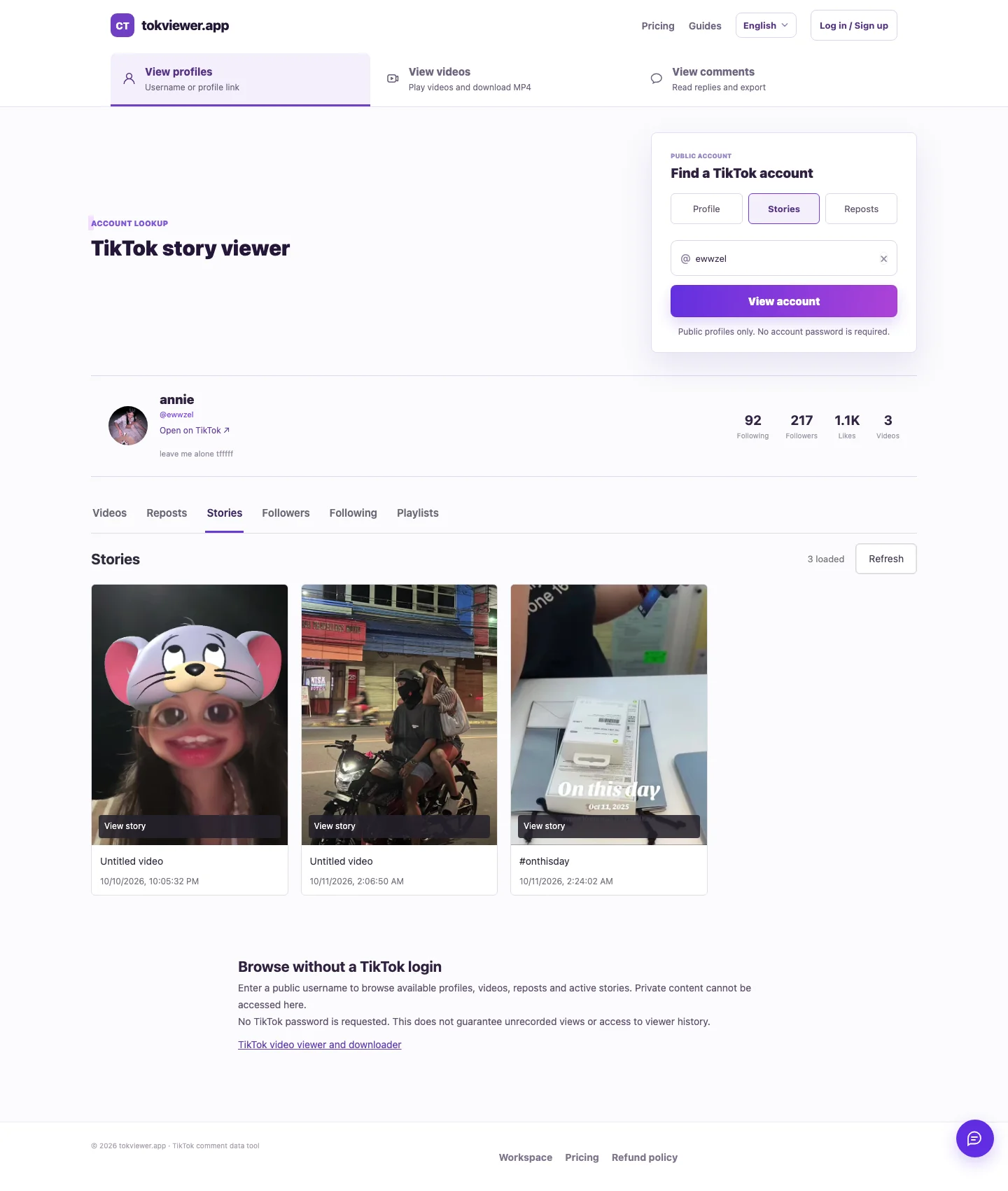
Actual product screenshot from the October 11, 2026 test. Story availability may differ today; this image does not establish creator-side anonymity.
Later on October 11, 2026, we verified the deployed Stories workflow using two public accounts. The earlier failures above remain useful evidence of what failed at that time; they no longer describe the capability demonstrated in that later test.
| Account at test time | Returned Story media | Production check |
|---|---|---|
ewwzel |
Three videos | All three opened and played; playback time advanced without a media error |
ddylaar |
One video and two photos | The video played and both photos displayed |
We checked the production browser workflow at mobile and desktop widths. These six observed media items are a small functional sample, not a measured success rate. Story availability changes, so the same usernames may return fewer items or no items when you try them later. Only ewwzel was also independently inspected in TikTok's own Story overlay; we did not perform a creator-side viewer-list comparison for either account.
Frequently asked questions
Is a free TikTok Story viewer also anonymous?
“Free” describes a price, “no TikTok login” describes a sign-in requirement, and “anonymous” is a privacy claim. None proves the others. Check the site's current limits and what content actually loads; we have not verified creator-side anonymity or established that every service is free.
Can I view a private TikTok Story by username?
TokViewer does not provide private-content access. A username input does not grant permission to content that TikTok restricts. Use TikTok's available audience and account access controls.
Does turning off profile view history hide Story views?
Do not assume that a profile-history setting changes Story viewing. The official Story article provides its own creator-side viewer-list instructions. We have not tested that setting against a Story viewer list, so this guide makes no claim that it hides Story views.
Can I download a TikTok Story with TokViewer?
We have verified regular public-video MP4 downloads, but not Story downloads. Those are separate capabilities. The public video downloader should not be described as a verified Story downloader.
Is an empty Story result proof that the Story expired?
No. Check the response status and the original content first. A source error, audience restriction or unavailable interface can also prevent results. A Highlight may remain visible beyond the ordinary Story window.
Which TikTok Story viewer is best?
Choose using evidence from the exact task: a known-active Story loads, the account matches, the media plays, and failures are explained. We have not established a best-tool ranking or independently verified third-party anonymity. A long list of promises is not a substitute for those checks.