How to View TikTok Stories Without an Account
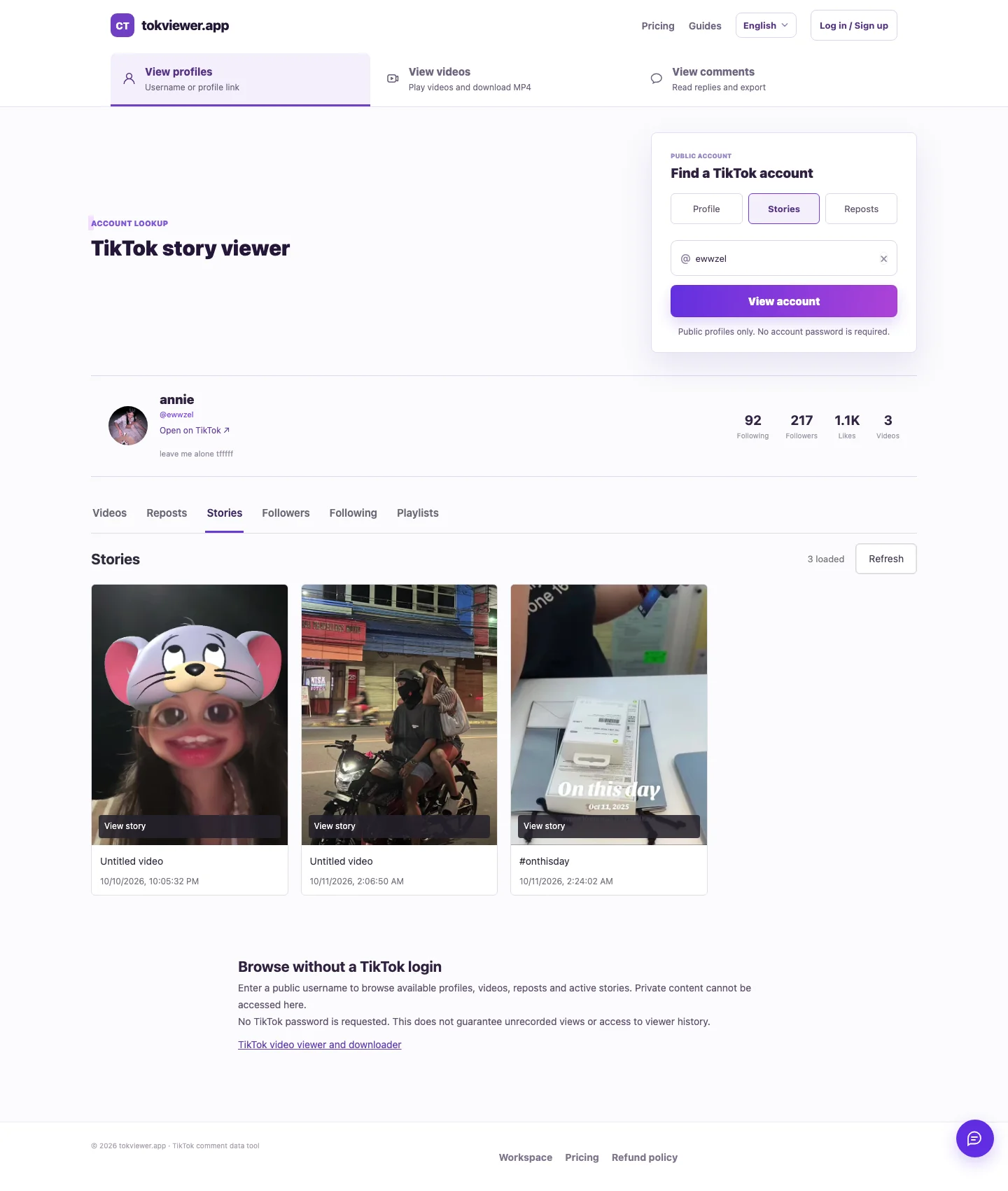
You can try viewing an available public TikTok Story in a browser without signing in to a TikTok account. TokViewer accepts a public username or profile link, then attempts to load current Story media. In our October 11, 2026 production checks, four videos played and two photos displayed across two public accounts. This is evidence of a working public-content workflow, not a promise that every account or Story is accessible.
Key Takeaways
- Use the exact public username or profile link and open the Stories section.
- A playable video or displayed Story photo is the meaningful result; an avatar alone is not.
- Stories can expire or become unavailable. Our example usernames are dated test samples.
- No TikTok login was supplied during our test, but creator-side anonymity was not verified.
Before you start
You need a browser, the creator's exact username or public profile link, and an available public Story. You do not need to supply a TikTok password for this TokViewer lookup. A private account or an unavailable Story is outside the verified workflow.
If someone sent you a regular TikTok video link, that is a different content type. Use the public video viewer for that workflow. A recent video in the post grid does not automatically qualify as a Story.
TikTok's official Stories help article describes ordinary Stories as photos or videos visible for 24 hours. Its instructions also discuss Highlights, which can keep selected Stories visible longer. You should distinguish these before diagnosing missing results.
Step 1: Identify the exact public account
Copy the username from the creator's profile or use their profile link. Display names are not unique, so comparing only a display name or avatar can lead you to the wrong creator.
For example, our dated checks used ewwzel and ddylaar. They are examples of what worked during testing, not permanent demo accounts or promises of active Stories today. There is no affiliation implied by mentioning these public accounts.
If you want to establish a known-active baseline, open the same account on TikTok at the time of testing. In our independent check of ewwzel, the avatar ring opened TikTok's Story overlay. Do not require a separate tab literally labeled “Stories” before checking an available avatar ring.
Step 2: Open the public Stories lookup
Open TokViewer's Stories section, enter the public username or profile link, and run the lookup. If the account page is already open on another section, switch to Stories.
The result must match the account you intended. A profile summary can load while Story retrieval fails, so check the content result separately. Public account details are useful for identifying the creator, but they do not prove that the Story itself is accessible.
You should not need to share your TikTok password to use this workflow. If a third-party page asks for a password or claims it can unlock private Stories, those claims go beyond what this guide verifies.
Step 3: Open and check the returned media
Open a returned item. For a video, confirm that it starts playing and that playback progresses. For a photo, confirm that the image loads. A thumbnail or loading indicator is not the same as successful media display.
Our production test opened and closed all six returned items. The four video players advanced playback time and reported no media error; the two photos displayed. We checked mobile and desktop browser layouts, not a packaged native app.
| Dated sample | Media returned | What was checked |
|---|---|---|
ewwzel |
Three videos | Each video opened and played |
ddylaar |
One video and two photos | Video playback and both photo displays |
These results were observed on October 11, 2026. They are not a benchmark across all creators, countries, browsers or network conditions. A sample can stop working simply because its Story window ends.
Step 4: Diagnose an empty or failed result
Compare the current source before deciding why nothing appeared. A valid empty list and a blocked request have different meanings. Neither profile details nor repeated retries can substitute for a known-active Story.
| What you see | What to do next |
|---|---|
| Profile loads, no Story media | Check whether the same creator currently has an available Story on TikTok |
| Request or source-loading error | Record the time and error; do not interpret it as a confirmed zero Story count |
| Private-content restriction | Use the access available through TikTok; public lookup does not bypass it |
| Old content still visible on a profile | Check whether it is a Highlight or a regular post |
| A video preview fails | Distinguish a media playback failure from a missing Story list |
For more diagnostic context, see the TikTok Story Viewer guide. It retains the distinction between early failed samples and later verified production playback.
Does viewing without an account mean the creator cannot see it?
That conclusion needs a separate test. Not supplying your TikTok credentials establishes a no-login workflow; it does not show what appeared in the creator's viewer list.
TikTok's official help says creators can see their Story view count and the accounts that viewed it. We did not compare a cooperating creator's viewer list before and after the TokViewer visit. We therefore do not promise that browser viewing leaves no trace or that it never affects a view count.
See can someone see your TikTok Story view? for the creator-side instructions and the limits of our verification. That privacy question also differs from the website's own data practices.
Frequently asked questions
Can I view a private TikTok Story without an account?
This guide verifies public content only. A username does not grant access to private or otherwise restricted content.
Can I see a Story after 24 hours?
An ordinary Story has the visibility window documented by TikTok. A saved Highlight can remain visible longer, but this guide does not establish TokViewer Highlight support or recovery of expired Stories.
Can I download the Story using this method?
The verified workflow here is video playback and photo display. It does not establish a separate Story download feature. Regular public-video downloads are a different product workflow.
Why do the example accounts no longer show the same results?
Stories change and expire. Our counts describe a dated test, not the creator's current inventory. Try an account whose active public Story you can independently confirm at the time.